Why your first digital product never gets finished
You have so much knowledge. Years of experience, hundreds of ideas, and a clear wish to finally turn all of that into a digital product. And yet, somehow, it never gets finished.
If that sounds familiar, please know you are not alone. In my work with coaches, therapists and consultants I see this again and again. Smart people, great experts, and their first digital product stays a half-finished folder on the laptop.
The good news: it is usually not a knowledge problem. It is a “I make it way too big” problem. In this article I show you the three biggest mistakes that stop you from creating your first digital product, and what you can do instead.
My name is Jyotima. I have been building online businesses for more than 15 years and have sold more than 12,000 courses. Believe me, I made every single one of these mistakes myself.
Prefer to watch? Here is the full video:
Mistake 1: You create too much
It usually starts with a small, clear idea. Then the thoughts come: “I should add this.” “And this.” “Maybe one more module.” “And a bonus.” Suddenly your little product has turned into a six-month project, and the motivation is gone long before the launch.
Here is the truth that changed everything for me: your customer does not want everything you know. They want one thing. They want to solve their problem, right now.
Imagine a big circle. Inside it is everything you know, all your experience and ideas. Now draw a tiny circle inside that big one. That tiny circle is what your customer needs right now. Your job is to find it, because that is where your first digital product lives.
Small. Clear. Finished.
Mistake 2: You create before you ask
You write the PDF, design it in Canva, record the videos, build the sales page and launch. And nobody buys. That hurts, I know it from my own experience.
So start with the problem instead of the product. Listen closely to your audience:
Which questions do people ask you again and again?
What do they write in comments on your posts?
What do they ask you in emails or after a session?
These questions are pure gold for finding digital product ideas. And if you already have followers, simply ask them: “Would this help you?”
You don’t need big market research to validate a product idea. You only need to know one thing: the problem is real.
Mistake 3: You price it too low
The third mistake is thinking that small automatically means cheap. “It’s only a small product, I can’t ask much for it.”
Let me give you an example. Imagine a ten-page PDF. Only ten pages, but it saves you ten hours of work and finally helps you finish your first product. Is that worth one dollar? Of course not. The PDF is small, the result is big.
So when you think about how to price digital products, stop counting pages. Ask these questions instead:
What problem does it solve?
How important is this problem for my customer?
How fast does it help?
How much time and stress does it save?
That is the real value of your digital product.
The better way: start small
Most people go like this: big product, lots of content, months of work. I do it differently: one problem, a simple solution, a fast result.
And here is the beautiful part. Your small digital product is not the end, it is the beginning. Someone buys it, tries your method and gets a result. They start to trust you. And then they want more: your mini course, your group program, your coaching.
Your tiny product is the door into your business.
Your shortcut: the Tiny Digital Product Starter Kit
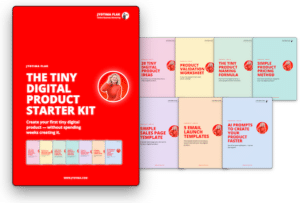
To help you avoid exactly these three mistakes, I created the Tiny Digital Product Starter Kit. Inside you get seven tools:
A collection of product ideas, so you find your tiny circle
A validation worksheet, so you know people want it before you create it
A naming formula for a name that makes people curious
A simple pricing method, so you stop guessing
A sales page template you simply fill in
Five email templates for your launch
AI prompts that help you create everything much faster
One thing is important to me: the AI does not replace you. Your knowledge is the value, the AI just helps you work faster.
You get instant access and can start today, for less than a dinner out.
A good first digital product solves one specific problem for one specific group of people. Think of a short guide, a checklist, a template or a mini course that helps your customer get one clear result quickly.
How long does it take to create a digital product?
If you keep it small and focused, you can create your first digital product in a few days. It only turns into a months-long project when you try to put everything you know into it.
How do I know if people will buy my digital product?
Look at the questions your audience asks you again and again, and ask your followers directly whether your idea would help them. If the problem is real and urgent, your product has a good chance to sell.
How should I price a small digital product?
Price it by the result it creates, not by its size. A short PDF that saves your customer hours of work or stress can absolutely have a higher price than a long one that solves nothing.
Can AI help me create a digital product?
Yes. AI tools can help you brainstorm ideas, structure your content and write sales texts much faster. Your knowledge and experience remain the real value of your product.
Start small and let your business grow
You don’t need a huge course or months of work to start selling digital products online. Find your tiny circle, check that the problem is real, give your product a fair price, and finish it.
Start small, create something useful, and let your business grow from there.
If this article helped you, subscribe to my YouTube channel. Every week I share practical tips on how to create and sell digital products, simple and step by step.
Is a GPT Better Than an Online Course? How to Choose the Right Digital Product
Is a GPT better than an online course? With AI changing the way we create and sell digital products, it’s a question more coaches, therapists, consultants, and creators are asking. You can now create AI assistants, custom GPTs, prompt packs, ebooks, and online courses faster than ever. But just because you can create an AI product doesn’t automatically mean it’s the best choice for your business. After more than 15 years in online business, I’ve learned to start with a different question: What’s the best way to package my expertise so it helps my customers get results? Let’s look at the differences between GPTs, online courses, and tiny digital products — and how you can choose the right format for your audience.
How AI Is Changing Digital Product Creation
AI has made creating digital products much faster and more accessible. You can use AI to brainstorm product ideas, outline an ebook, draft course lessons, create worksheets, develop marketing content, or build a custom GPT that helps customers complete a specific task. That’s fantastic. I use AI tools myself to speed up my work and explore new possibilities. But there’s a potential trap: believing you have to create an AI product simply because everyone is talking about AI. The fact that a product uses artificial intelligence doesn’t automatically make it more valuable. What matters is whether it solves a real problem for your customer. If your customer needs a clear, step-by-step process, an online course might be the best solution. If they need personalized help applying a method to their own situation, an interactive GPT could be useful. And if they need a simple resource to get started, a small digital product might be all they need. The technology is not the strategy. Your customer’s problem is the strategy.
GPT vs. Online Course vs. Tiny Digital Product
Let’s make this practical. Imagine you’re a business coach, and your customer wants to create their first sales page. You could offer three different solutions.
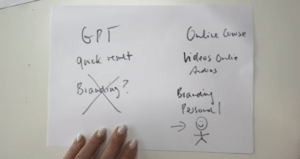
A GPT gives quick results. An online course with your videos and voice builds your personal brand.
1. An Online Course: Teach the System An online course takes your customer through a structured learning experience. You could teach them how to understand their audience, write a compelling headline, communicate the benefits of their offer, handle objections, and create a clear call to action. An online course works particularly well when your customer needs to understand a process and learn a skill step by step. It’s also a way to package your knowledge so customers can learn from you without needing to book individual sessions for every question.
2. A Tiny Digital Product: Help Them Take Action
Instead of a full course, you could create a sales page workbook, a template, a checklist, or a simple implementation guide. This gives your customer something practical to work with right away. Tiny digital products are especially useful when someone needs help completing one specific task rather than learning an entire subject. They can also be an accessible entry point into your business, allowing customers to experience your approach before investing in a larger program.
3. A Custom GPT: Provide Interactive Support
You could also create a custom GPT that asks your customer questions about their business and helps them draft their sales page. Rather than simply reading information or filling in a worksheet, the customer interacts with the tool and receives responses based on their input. A GPT can be useful when customers need guidance, ideas, or help adapting a framework to their individual circumstances. However, its quality depends on how well it’s designed, the instructions and information behind it, and the customer’s ability to review and apply its output. A GPT doesn’t automatically replace your expertise. It can help deliver parts of your method in a more interactive way. One more difference: a GPT rarely builds your personal brand. In an online course, people see your face and hear your voice, and that’s what makes them remember you
The Smartest Approach? Combine Your Digital Products
Here’s where things get interesting: you don’t necessarily have to choose just one format. You could create a small ecosystem of digital products that work together.
Online course: Teach your method and explain the process.
Workbook or template: Help customers implement what they’ve learned.
Custom GPT: Give them interactive support as they apply the method to their own situation.
Each product has a different purpose, but they all help the customer move toward the same result. This approach can also create a natural product ladder. Someone might start with a low-cost template, continue with a mini-course, and later invest in a more comprehensive program. You don’t need to build everything at once. Start with one useful product, learn what your customers need, and expand when there’s a good reason to do so. If you already have an online course, adding a GPT can be the perfect reason for a new version and a re-launch.
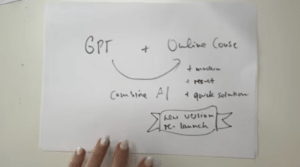
Combine AI with your existing course: more modern, a fresh reset, a quick solution, and a reason to re-launch.
Should You Create an AI Product Just Because You Can?
My answer is no. Don’t create a GPT simply because everyone else is creating GPTs. And don’t add AI to an existing offer just so you can call it an AI-powered product. Instead, ask yourself five questions:
Does AI make the customer experience better?
Does it save my customer time?
Does it make implementation easier?
Does it help personalize the process?
Does it help the customer achieve a result more effectively?
If the answer is yes, AI might be a valuable addition. If it only makes your sales page sound more modern without improving the actual experience, you may not need it. Start with the outcome your customer wants. Then choose the format that delivers that outcome in the most useful way.
Your Expertise Is Still the Product
As AI makes information easier to access, I believe your personal expertise becomes even more important. Your experience, your perspective, your method, your stories, and your ability to understand your customers are what make your work distinctive. If you’re a coach, your experience still matters. If you’re a therapist, your professional knowledge and judgment still matter. If you’re a consultant, your methodology and understanding of your clients’ challenges still matter. AI can help you organize your knowledge, create content faster, and deliver parts of your method in new ways. But AI doesn’t magically give you expertise. You bring the knowledge, experience, and judgment. The technology helps you package and deliver them. That’s why I wouldn’t reinvent your entire business every time a new AI tool appears. Instead, look at what you already know, what your customers need, and how you can make your expertise more accessible.
How to Create Your First Digital Product Without Getting Overwhelmed
If you have lots of knowledge but aren’t sure what to turn into a digital product, start small. You don’t need a huge online course, an elaborate sales funnel, or a complicated AI system on day one. Start with these steps: Step 1: Choose one specific customer problem. Think about the questions your clients ask repeatedly. What do they struggle with? What could you help them accomplish faster? Step 2: Choose a suitable format. Would a checklist, template, ebook, mini-course, or interactive tool help them most? Choose the format based on the problem, not on what’s trending. Step 3: Create a simple first version. You can use AI to brainstorm, outline, draft, and refine your content. Add your own experience and expertise, and make sure the final product delivers real value. Step 4: Validate your idea. Talk to potential customers, gather feedback, and consider testing demand before spending weeks creating a product no one has asked for. Step 5: Make it easy to buy and use. Once your product is ready, create a clear sales page and a simple delivery process. You can automate parts of the customer journey as your business grows. You can learn more about choosing and creating your first offer in my guide to digital product ideas you can create in a weekend.
Ready to Turn Your Knowledge Into a Digital Product?
If you want to create your first digital product but feel overwhelmed by all the possibilities, I’ve created something to help you get started. My Tiny Digital Product Starter Kit includes product ideas, a validation worksheet, a naming formula, a simple pricing method, a sales page template, email launch templates, and AI prompts to help you work faster.
.
It’s designed to help you move from an idea to a practical digital product without getting stuck in endless planning. And remember: you can absolutely use AI to help you create your product. Just don’t forget what makes it valuable in the first place. AI is the tool. Your expertise is the value. Use it to shine brighter. — Jyotima
Frequently Asked Questions
Is a GPT better than an online course?
Not necessarily. A custom GPT can provide interactive assistance for specific tasks, while an online course is often better for structured learning and step-by-step teaching. The right choice depends on your customer’s needs and the result you want to help them achieve.
Can I sell a custom GPT as a digital product?
You can build a business around GPT-based tools and AI-assisted experiences, but the best delivery and monetization options depend on the platform, its current features, and your business model. Consider access, ongoing maintenance, customer support, and the value your GPT provides before choosing your offer.
Can I combine a GPT with an online course?
Yes. An online course can teach your method, a workbook can guide implementation, and a GPT can help customers apply what they’ve learned. Combining formats can create a more useful learning experience when each element has a clear purpose.
What is the easiest digital product to create as a beginner?
A checklist, template, short ebook, or focused workbook can be a manageable starting point. Choose a specific problem you understand well, create a useful solution, and test it with your audience before investing in a larger product.
Do I need AI to create and sell digital products?
No. AI can help you research, plan, write, and organize your content, but you can create and sell digital products without it. Focus first on your audience, your expertise, and the problem you’re solving.
If you’ve been dreaming about starting your online business but feel overwhelmed by the idea of creating a big course, you’re not alone. Many coaches, consultants, and entrepreneurs get stuck at the start because everything looks too complicated: tech, design, endless content.
The good news? You don’t need months or a big studio setup to launch your first product. A mini course is the perfect entry point – small, focused, and doable in just one weekend. In fact, with the right structure, you can create your very first mini course in only 3 hours.
In this article, I’ll walk you step by step through the exact process I use and teach in my Mini-Course Method. By the end, you’ll have:
A clear topic and promise
A simple outline (3–5 lessons)
Lightweight slides or a helper asset
Recorded lessons ready to share
A delivery system so you can sell your course
Let’s get started.
Why a Mini Course Is the Smartest Way to Start
Big online courses can feel overwhelming. They take months to produce and often never get finished. A mini course, on the other hand, is:
Fast to create – just 3–5 short lessons
Focused on results – one clear win for your audience
Easy to sell – low entry price, high value
Perfect for automation – can be sold 24/7 through a simple funnel
For beginners, it’s the fastest way to validate your idea and earn your first income online.
Step 1: Define Your Promise (30 minutes)
Every mini course starts with clarity. Answer this question:
“I help [who] get [result] in [timeframe] without [big obstacle].”
Examples:
“I help exhausted moms regain their energy in 7 days without restrictive diets.”
“I help new coaches book their first 3 clients this month without paid ads.”
“I help beginners meditate daily in 7 days without complicated techniques.”
Keep your promise short, clear, and specific.
Step 2: Name and Outline Your Course (30 minutes)
Pick a name that says exactly what it does. Examples:
7-Day Energy Reset
First 3 Clients
Meditation Quickstart
Then outline your course into 3–5 lessons:
Start Here (goal + roadmap)
Step 1
Step 2
Step 3
Quick Wins & Next Steps
Each lesson should be 5–10 minutes max.
Step 3: Create One Helper Asset (30 minutes)
Open Canva and make one simple worksheet, checklist, or tracker. Examples:
Daily habit tracker
Roadmap or one-page overview
Email template or journal prompts
This makes your mini course feel more valuable and helps your students get results faster.
Step 4: Record Your Lessons (60 minutes)
No fancy studio needed. Here’s what works:
Use your phone or laptop
Sit near a window for natural light
Put your phone on airplane mode
Record each lesson as a separate video
Smile, speak to one person, and keep it natural. Mistakes are okay – authenticity sells.
Step 5: Package and Deliver (30 minutes)
You now have everything you need. Here are 3 simple delivery options:
Private folder: Upload to Google Drive or Dropbox and share a private link.
Unlisted YouTube + page: Upload your lessons as unlisted videos and put them on a private page with your worksheet.
Simple storefront: Use a basic checkout tool so buyers get automatic access after purchase.
Start with a beginner-friendly price: $9–$49.
Example: Meditation Quickstart
Promise: “Learn to meditate daily in 7 days—no apps, no complicated techniques.”
Lessons:
Start Here: Set your 7-day plan
5-minute breath method
What to do when your mind races
Create your mini routine
Staying consistent after 7 days
Helper Asset: A one-page 7-day tracker
Price: $19 for first buyers
Your 3-Hour Sprint Checklist
✔ 30 min: Define your promise + course name ✔ 30 min: Outline 3–5 lessons ✔ 30 min: Create one worksheet ✔ 60 min: Record your lessons ✔ 30 min: Package, price, and deliver
Done. Your first digital product is ready.
Next Steps
You just created your first mini course in 3 hours. Imagine what’s possible if you put this into a system that works for you every day – reaching clients, making sales, and giving you more freedom.
If you want the full roadmap, check out my book The Mini-Course Method – where I teach you how to scale with automation and create a real freedom business.
If I had to start from scratch with digital products in 2025, here’s exactly what I’d do. Even if you have no audience, no tech skills, and limited time, it’s completely possible to create a profitable online business.
As a coach, therapist, or creator, digital products allow you to share your knowledge, help more people, and generate income without being tied to 1:1 sessions. I’ve personally built a six-figure business selling mini-courses and other digital products — all automated — while working part-time and raising my daughter.
Below, I break down the exact steps I’d take today to build a digital product business from zero.
Step 1: Pick a Problem You Can Solve
The first step is to find a problem your audience is struggling with. This can be a common pain point for your clients or followers.
Example:
“Find Calm in 5 Minutes a Day” – perfect for busy parents or stressed professionals.
“Create Your First Coaching Funnel in 7 Days” – for aspiring coaches.
The key is specificity. The clearer the problem, the easier it is to sell a solution.
Step 2: Create a Small, Focused Digital Product
Start with a mini-course, workbook, audio guide, or template. Don’t overcomplicate it — a short, focused product works best.
Tips:
Break your content into 3–5 lessons.
Keep it actionable and results-focused.
Record videos on your phone or Loom.
Example Products:
Mini-Courses: “Daily Rituals for Calm & Clarity”
Workbooks: “Mindset Reset Journal”
Audio Guides: “Morning Grounding Meditation”
Step 3: Use Simple Tools
You don’t need fancy software or a huge tech setup. Some of my favorite tools include:
Canva for workbooks, templates, and visuals
Notion or Google Docs for writing
Payhip or Gumroad for automated sales and delivery
Audacity or GarageBand for audio recordings
Keep it simple, start small, and release your product. You can always improve it later.
Step 4: Build Your Launch System
Your product needs a way to reach people — even if it’s just a basic launch.
Social media posts with tips, behind-the-scenes, or small snippets
The goal is consistent visibility. You don’t need to be viral — focus on getting your first few paying clients.
Step 5: Automate and Scale
Once you’ve made your first sales, automate as much as possible:
Evergreen funnels that sell 24/7
Email sequences to nurture leads automatically
Upsells and bundles for additional revenue
Automation is what transforms your knowledge into a freedom business — you earn while focusing on other priorities.
My Personal Experience
I started posting content consistently for 6 weeks before going viral. My first small product, a TikTok mini-course, made over €40,000. I didn’t need fancy cameras or a huge following – just discipline, a clear product, and the right strategy.
Today, I’ve built multiple automated income streams with digital products and continue to help other coaches, therapists, and creators do the same.
Your Next Step
If you’re ready to take action, start small. Pick one idea, create your first mini-product, and launch.
Want guidance to go from idea to a ready-to-sell product in a weekend? Check out my Online Course Turbo, designed for busy coaches, therapists, and creators who want results without tech overwhelm:
Don’t wait — start building your automated online business today and finally turn your knowledge into income. Remember: small steps lead to big results!
Yours Jyotima
Categories
Archives
Manage Consent
To provide the best experiences, we use technologies like cookies to store and/or access device information. Consenting to these technologies will allow us to process data such as browsing behaviour or unique IDs on this site. Not consenting or withdrawing consent, may adversely affect certain features and functions.
Functional
Always active
The technical storage or access is strictly necessary for the legitimate purpose of enabling the use of a specific service explicitly requested by the subscriber or user, or for the sole purpose of carrying out the transmission of a communication over an electronic communications network.
Preferences
The technical storage or access is necessary for the legitimate purpose of storing preferences that are not requested by the subscriber or user.
Statistics
The technical storage or access that is used exclusively for statistical purposes.The technical storage or access that is used exclusively for anonymous statistical purposes. Without a subpoena, voluntary compliance on the part of your Internet Service Provider, or additional records from a third party, information stored or retrieved for this purpose alone cannot usually be used to identify you.
Marketing
The technical storage or access is required to create user profiles to send advertising, or to track the user on a website or across several websites for similar marketing purposes.